Direct answer: AI workflow automation means connecting your everyday apps so data moves between them on its own, with AI handling the judgement steps (drafting, sorting, summarising) and tools like Zapier or Make handling the plumbing. For a UK small business, the method that works is simple: pick ONE workflow, map it on paper, automate one stage at a time, and measure the hours you get back. This guide walks you through it — with a worked example you can copy.
Why one workflow, not everything
The 2026 Amex SME Business Barometer (1,000 UK SME owners, run with Small Business Saturday UK) found owners spend 11 hours a week on admin or finance tasks — roughly six working days a month — and 54% say paperwork gets in the way of running the business. That is the prize. But the usual mistake is automating everything at once and ending up with half-built zaps and a bill for tools nobody trusts.
The fix is a method, not a shopping list:
1. Pick one workflow — the one you repeat most, hate most, and can describe as a checklist.
2. Map it on paper — every step, every app, every minute of your time it currently eats.
3. Automate stage by stage — one trigger, one action, tested before you add the next.
4. Add AI only where judgement lives — drafting quotes, sorting enquiries, summarising notes.
5. Measure the hours saved — run it for a month alongside the old way, then commit.
That is the whole method. Everything below is applying it.
Step 1: Pick one workflow
Good candidates share three traits: frequent (happens weekly or more), repetitive (same steps each time), and annoying (you put it off). For most UK small businesses, the shortlist looks like this:
- New enquiry comes in → qualify → send a quote → chase it → win or lose
- Booking confirmed → reminder sent → review requested after the appointment
- Job done → invoice issued → payment chased → books updated
Pick the one that visibly costs you jobs or evenings. For most trades firms, that is the enquiry-to-invoice chain: slow responses lose work to faster competitors, and forgotten follow-ups are quotes left on the table. Our guide to WhatsApp automation for small business covers the reminder side of that chain in detail.
Step 2: Map it on paper first
Before touching any software, write out the workflow as numbered steps. Use a whiteboard or a napkin — the tool does not matter. What matters is that every step names who does it, which app it lives in, and how long it takes. You cannot automate what you have not described.
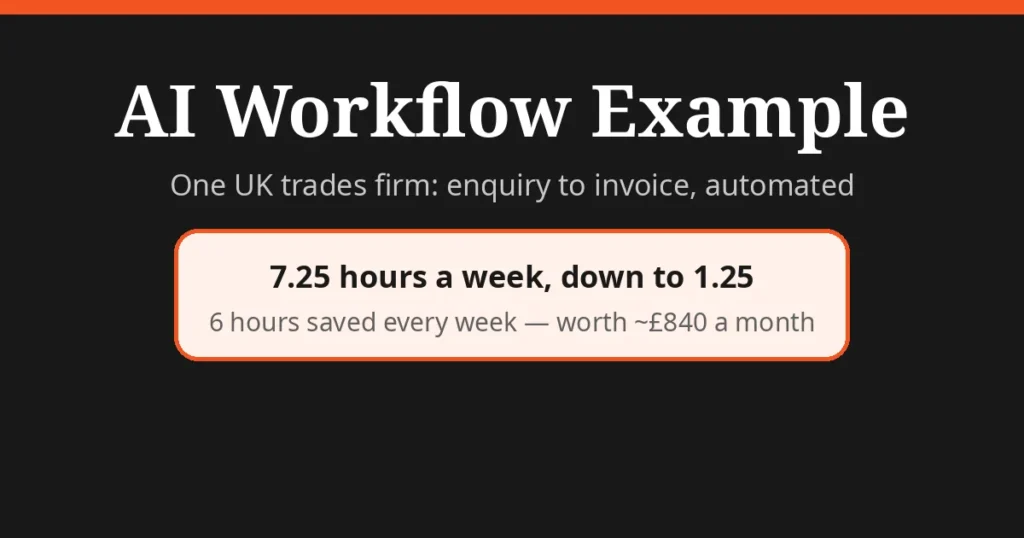
Here is that for a hypothetical UK plumbing firm getting roughly 8 enquiries a week. Important label: the figures below are my own illustrative workings, computed step by step from the workflow — not surveyed data. Your numbers will differ; the point is the arithmetic.
| Workflow stage | Manual minutes/week | Automated with | Minutes/week after |
|---|---|---|---|
| Enquiry arrives → logged and qualified | 80 | Web form → Make scenario sorts by job type; AI scores urgency | 10 |
| Quote written and emailed | 200 | AI drafts quote from your template + photos; you review and send | 40 |
| Non-responders chased (day 3, day 7) | 75 | Automatic email + WhatsApp follow-up sequence | 5 |
| Job done → invoice issued, payment logged | 80 | One click generates invoice in Xero/QuickBooks; reminders auto-send | 20 |
| Total | 435 (~7.25 hrs) | 75 (~1.25 hrs) |
The maths: 435 − 75 = 360 minutes saved per week, or 6 hours. At £35 an hour of owner time (a conservative figure for a skilled tradesperson), that is £210 a week — roughly £840 a month — for an automation stack costing under £20. Even at half these timings, the ratio is why the method works.
AI does the narrow judgement steps (drafting, scoring urgency); automation does the plumbing (moving data, sending follow-ups). That division is the whole game.
Step 3: Build it in this order
Build stage by stage, testing each before adding the next:
1. Trigger first. Get "new enquiry via website form" firing reliably into Zapier or Make before anything else. Test it with your own name and number.
2. Add the AI step. Pipe enquiry details into an AI action that drafts the quote or scores the lead, using your actual template and pricing as the prompt's reference. Never let AI invent prices.
3. Add the follow-ups. Day-3 and day-7 reminders are where most quotes die quietly — the highest-return automation per minute of setup. Our AI invoicing automation guide covers the invoice end of the chain.
4. Run it in parallel for a week. Keep doing it manually alongside the automation, and hand it over only when the outputs match consistently.
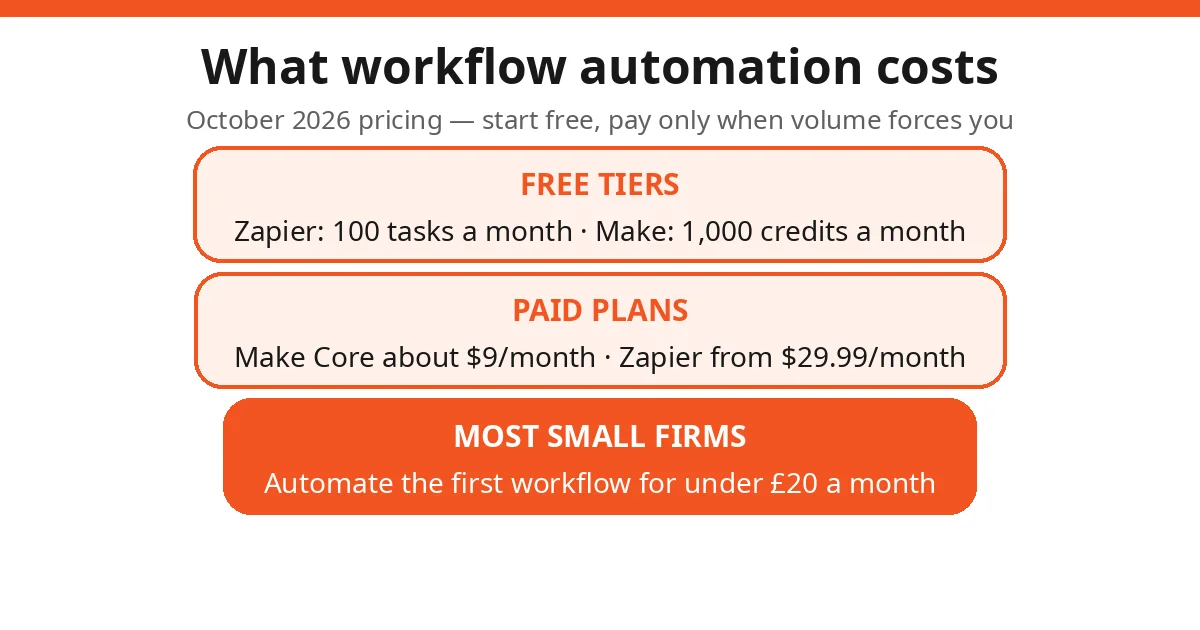
On costs (October 2026 pricing): Zapier's free tier covers 100 tasks a month, with paid plans from $29.99/month — simplest setup, widest app library. Make's free tier covers 1,000 credits, with its Core plan at about $9/month for 10,000 credits — cheaper once workflows get multi-step. Start free; pay only when volume forces you.
Step 4: Handle the GDPR bit properly
Automation moves customer names, phone numbers, addresses and job details between apps — that is personal data under UK GDPR, and a broken data flow is a compliance problem, not just a tech one. Three rules cover most small firms (our GDPR and AI guide for UK small businesses goes deeper):
- Use the data processing agreement. Zapier, Make and the mainstream AI tools all publish DPAs; accept or sign them rather than ignoring the topic.
- Choose UK/EU data residency where offered. If a platform lets you pin processing to Europe, do it.
- Move only what the step needs. Your follow-up zap needs a name and phone number, not the customer's full enquiry history. Less data moving means less exposure if something breaks.
Step 5: Measure, then expand
After a month, redo your table from Step 2 with real figures. Where a stage isn't saving time, the reason is usually one of four — which brings us to the limits.
Three more AI workflow examples
The plumbing firm above is the deep example. Here are three shorter ones UK small businesses run every day — same method, different workflow:
Salon bookings → reminders → reviews. A client books online. The booking system fires an instant confirmation, a WhatsApp reminder 24 hours before, and — after the appointment — a review request with your Google review link. The AI step is small but real: personalising the reminder with the stylist's name and the service booked, so it reads like a person, not a robot. Manual version: someone texts every client by hand and forgets half of them.
Estate agent portal enquiry → viewing → feedback. A Rightmove or Zoopla enquiry lands. Automation logs it in your CRM instantly; AI drafts a viewing invitation using the property details and the enquirer's stated requirements; you approve and send in one tap. Day-before-viewing reminders go out automatically, and a feedback request follows the viewing. The agent's time goes to the viewing itself, not the admin around it.
Freelancer invoice chasing. Invoice issued in Xero or FreeAgent. Day 7 overdue: a polite automated nudge. Day 14: a firmer one. Day 30: a "final notice" before you pick up the phone. The moment the invoice is marked paid, the sequence stops itself. Nobody enjoys chasing money; automation does it on schedule without the awkwardness — and late payers respond to consistency, not charm.
Each of these follows the same five steps: pick it, map it, build it stage by stage, add AI only where judgement lives, measure it.
Honest limits
AI workflow automation is genuinely powerful, and it breaks in genuinely predictable ways:
- Brittle connections. When an app renames a field or changes its API, the automation fails — silently or loudly, at 2am. Set up failure alerts (both platforms have them) so a broken zap pings you instead of dropping customers, and budget an hour a month for maintenance.
- Garbage in, garbage out — faster. Automation doesn't fix bad data; it multiplies it. Enquiries arriving as free-text mush ("plumbing job, call me") produce mush drafts. A structured enquiry form is often a better investment than a cleverer prompt.
- Automating a broken process just makes mistakes faster. If your pricing is inconsistent, automation produces consistently wrong quotes at scale. Fix the process on paper first (Step 2).
- Keep a human in the loop where it matters. AI drafts; you approve. Quotes above a value threshold, complaints, anything touching vulnerable customers — those get a human review step by design, not by accident. If your workflow runs mostly through email, pair it with a proper AI email management setup so automated messages don't vanish into a chaotic inbox.
None of these are reasons not to automate. They are reasons to automate one workflow, measure it, and keep the human where the human adds value.
FAQs
What is AI workflow automation for a small business?
AI (drafting, categorising, summarising) combined with automation software like Zapier or Make (moving data between apps on triggers). For a small business it means taking one repetitive workflow — handling new enquiries, say — and removing the manual copy-paste steps.
How much does workflow automation cost for a UK small business?
Start free: Zapier's free tier covers 100 tasks a month and Make's covers 1,000 credits. Outgrow that and Make's entry plan is about $9/month; Zapier's paid plans start at $29.99/month billed monthly. Most small firms automate their first workflow for under £20 a month.
Which workflow should a small business automate first?
The one you repeat most often, hate most, and can describe as a checklist. Enquiry handling, quote follow-ups, booking reminders and invoicing are the usual winners. If a process is chaotic or broken, fix it on paper before you automate it.
Is it safe to send customer data through automation tools under GDPR?
Yes, if you do it properly: use the platform's UK/EU data residency option where offered, accept its data processing agreement, and only move the personal data each step needs. Avoid pushing sensitive details through free consumer AI tools with unclear data policies.
Do I need technical skills to build AI workflow automations?
No. Zapier and Make are built for non-technical users, and AI steps (drafting, summarising) are configured in plain English. The skill that actually matters is being able to map your own process on paper first — the building is the easy part.
What goes wrong with AI workflow automation?
Automations break when a connected app changes its API; bad data in means bad data out at machine speed; automating a broken process makes mistakes faster; and pricing judgement calls, complaints and anything sensitive should keep a human in the loop.
How long does it take to automate one workflow?
A first simple workflow takes an afternoon to a weekend: an hour or two to map it, a few hours to build and test, then a week running it alongside the manual process before you trust it. Start with one workflow, not five.