Direct answer:
AI workflow automation for a small business means letting software handle the repetitive steps between your tools — collecting enquiry details, updating your CRM, drafting follow-ups, chasing documents — so your people only touch the decisions. You do not need an enterprise budget or a developer. You need one well-chosen process, a tool you already mostly understand, and a human check before anything important leaves the building.
Why this matters now for UK small businesses
Every small business in the UK runs on the same hidden tax: the time spent moving information from one place to another. An enquiry arrives by email, gets copied into a spreadsheet, then into a CRM, then someone drafts a reply, then someone else chases the missing details. None of that work wins a customer. All of it costs hours.
AI workflow automation attacks exactly that layer. It does not replace your judgement, your relationships, or your craft. It replaces the copying, the chasing, and the remembering. A trades firm in Leeds, a bookkeeping practice in Bristol, a three-person marketing agency in Manchester — all of them run the same handful of repetitive processes, and all of them can hand the repetitive parts to software.
There is also a timing argument. Customers now expect a fast acknowledgement. If someone fills in your contact form at 9pm and hears nothing until the next afternoon, they have often already contacted your competitor. An automated acknowledgement, a next-steps message, and an internal task created in your CRM cost you nothing in attention once they are set up — and they buy you the hours you need to reply properly.
None of this requires you to become a “tech company”. The tools in this guide are no-code, subscription-based, and designed for people who run businesses, not software projects. The hard part is not the technology. It is choosing the right first workflow and resisting the urge to automate everything at once.
What “AI workflow automation” actually means
Strip away the marketing language and a workflow is just a chain: when X happens, do Y, then Z. The “AI” part enters in a few specific places:
- Understanding messy input. A customer writes “my boiler’s making a funny noise and I need someone Thursday-ish”. An AI step can pull out the service type, the urgency, and the preferred day from that free text, where a rigid rule would fail.
- Drafting. Instead of a fixed template, an AI step can draft a reply that uses the actual details of the enquiry — the customer’s name, the service, the location — so the human only edits and approves.
- Deciding the route. An AI step can classify an incoming message — new enquiry, complaint, supplier invoice, job application — and send each type down a different path.
Everything else in the workflow is ordinary automation: triggers, conditions, and actions that move data between systems. You do not need AI in every step. In fact, most good workflows are mostly plain automation with one or two AI steps where the input is genuinely messy or the draft genuinely benefits from it.
A useful test: if you can describe the step as “always do exactly this”, it is plain automation. If you have to say “it depends on what they meant”, that is where an AI step earns its place.
Step 1: Pick the right first workflow
The biggest mistake small businesses make is starting with the most impressive workflow instead of the most boring one. Pick against these criteria:
- It happens often. At least several times a week. Rare processes are not worth automating first.
- It is done the same way every time. If every instance is a special case, automation will fight you.
- A mistake is cheap and visible. Your first workflow should be one where an error is easy to spot and easy to fix — not payroll, not refunds.
- It crosses at least two systems. If the whole job lives inside one app, that app probably already has a built-in feature for it. Automation pays when data has to travel.
Good first candidates for most UK small businesses:
- New enquiry handling. Form submission → create or update CRM contact → send acknowledgement → create a task for the right person → log it in a shared sheet.
- Appointment and reminder flow. Booking → confirmation email → reminder 24 hours before → follow-up message afterwards asking for a review.
- Document chasing. Quote sent → automatic polite follow-ups on day 3 and day 7 → task created if still unanswered on day 10.
- Invoice reminders. Invoice overdue by 7 days → draft a polite reminder for a human to approve → send → log the action.
Notice what is not on this list: anything involving pricing decisions, complaint handling, hiring, or dismissals. Those stay human, with automation doing the preparation around them.
Step 2: Map the process before you touch a tool
Write the current process down, step by step, exactly as it happens today — including the ugly parts. A typical enquiry process looks like this:
- Customer fills in the website form.
- The form emails the office inbox.
- Whoever sees it first forwards it to the right person, or replies “thanks, we’ll be in touch”.
- Someone creates a contact in the CRM, copying name, phone, email, and enquiry details by hand.
- Someone drafts a reply, often retyping details already given.
- If the customer replies with missing information, the thread goes back and forth.
- If nobody replies within a day or two, the enquiry quietly dies.
Now mark each step: automate, assist (AI drafts, human approves), or human only. For the example above: steps 2–4 are automate, step 5 is assist, step 6 is human only with automated reminders, and step 7 gets an automated safety net — a task that appears if no reply has been sent within a set time.
This map is also your testing checklist. You will test the automated workflow against real examples of each case, including the awkward ones: a form with a missing phone number, a customer who writes in all caps, an enquiry that arrives twice.
If you skip the map, you will build a workflow that automates your current confusion, and you will spend more time fixing it than the manual process ever cost. The map takes an hour. It saves weeks.
Step 3: Choose tools you can actually live with
You do not need many tools. A typical small-business automation stack is three layers:
| Layer | What it does | Typical choices |
|---|---|---|
| Where work lives | CRM, inbox, calendar, accounting | HubSpot, Zoho, Gmail/Outlook, Xero, QuickBooks |
| The connector | Moves data and runs the workflow | Zapier, Make, Microsoft Power Automate, n8n |
| The AI step | Reads messy text, drafts messages, classifies | Built into the connector, or a general AI assistant with an API |
A few practical notes on choosing:
- Start with what you already pay for. Many CRMs and accounting tools have built-in automation that covers simple workflows for free. Check those first before buying a connector.
- Prefer the tool your team will actually open. The best automation platform is the one someone on your team understands well enough to fix at 4pm on a Friday.
- Check where data is processed. If a tool handles personal data of your customers, you need to know whether it processes data in the UK or under an adequacy arrangement, and you need a data processing agreement. This is a UK GDPR requirement, not a nice-to-have.
- Avoid a tool that only one person understands. Document each workflow: what triggers it, what it does, and how to switch it off. If that person is on holiday when it breaks, someone else needs to stop it.
For more detail on picking the connector layer, see our guide to the best automation tools for small businesses in the UK, and for a concrete example of a working setup, see our AI workflow example for a UK business.
Step 4: Build it in stages, and test like a sceptic
Build the workflow in this order:
- Trigger and data capture only. Get the enquiry from the form into the CRM reliably. Test with ten different submissions, including bad ones.
- Add the internal actions. Tasks, notifications, sheet logging. Check that duplicates are handled — the same person enquiring twice should update one contact, not create two.
- Add the customer-facing message, as a draft. For the first week or two, route it to a human for approval rather than sending automatically. Read every single one.
- Only then switch to automatic sending, and only for the straightforward cases. Keep exceptions routed to a human.
Testing checklist for every workflow before it goes live:
- What happens when a required field is blank?
- What happens when the same person submits twice?
- What happens when the CRM or email service is briefly unavailable — does the workflow retry, or silently drop the enquiry?
- What happens when the customer writes something the AI step cannot classify? Is there a default route to a human?
- Can you switch the whole workflow off in under a minute?
That last question matters more than it sounds. Every automation will misbehave eventually. The difference between a minor embarrassment and a real problem is whether someone can stop it quickly.
Five workflows worth building after the first one
Once your first workflow is stable, these are the next most valuable for a typical UK small business:
1. The enquiry-to-appointment chain
Form → CRM contact → automatic acknowledgement with a booking link → calendar event → reminder messages → post-appointment follow-up. The value here is speed: the customer gets an immediate, useful reply, and your diary fills without phone tag.
2. The quote-chasing safety net
Quote sent → follow-up on day 3 → a different, more useful follow-up on day 7 (a case study, a common question answered) → task for a human on day 10. Most lost quotes are not lost on price; they are lost because nobody followed up. Automation fixes the follow-up without making it feel robotic — provided a human reviews the wording.
3. The review request
Job completed or order delivered → wait 48 hours → request a review with a direct link → if no response, one gentle reminder → log the review for your records. Reviews compound: they feed local search, and local search feeds enquiries. This is one of the highest-return workflows for any business that serves a local area.
4. The supplier and invoice routine
Invoice received by email → AI step extracts supplier, amount, and due date → draft entry in accounting software → human approves → payment reminder set. This pairs naturally with document automation — automating quotes, contracts, forms and reports — for the document side of the same problem.
5. The internal handover
When a job moves from sales to delivery, or from one team member to another, an automated handover pack — customer details, what was promised, outstanding questions — removes the “I thought you knew” failure mode. This is unglamorous and extremely valuable.
The UK compliance bits you cannot skip
Automation does not remove your legal responsibilities; it changes where they bite. The points that matter most for a UK small business:
- UK GDPR lawful basis. You need a lawful basis for processing personal data in each workflow — usually legitimate interests or contract performance for enquiries and customers. Document it briefly; a paragraph per workflow is enough.
- Data processing agreements. Any tool that processes personal data on your behalf needs a data processing agreement (DPA) with you. Most reputable tools offer one as standard — check, and keep a copy.
- Marketing messages. Automated emails and texts to customers are still marketing under the Privacy and Electronic Communications Regulations (PECR). You need consent or the soft opt-in for existing customers, and every message needs a working unsubscribe route. Automation makes it easy to send a lot of messages; PECR is the reason you must not.
- Financial and customer-facing outputs. If an automated step produces a quote, an invoice, or a message that commits your business, a human should approve it. This is both a quality control and a liability control.
- Record keeping. Keep a simple log of what each workflow does and when it changed. If a customer ever asks what happened to their data, or a regulator ever asks, that log is your answer.
None of this is a reason not to automate. It is a reason to automate deliberately, with the human checks in the right places. Our GDPR and AI guide for UK small businesses goes deeper on each of these points.
Measuring whether it is actually working
Automation that nobody measures quietly rots. For each workflow, pick one or two numbers and check them monthly:
- Enquiry response time. How long from form submission to first human-quality reply? Before automation, this was often hours. After, the acknowledgement is instant and the human reply should be faster too.
- Enquiries lost. How many enquiries got no reply at all? This number should fall to near zero once the safety-net tasks are in place.
- Time saved, honestly counted. Ask the person who used to do the job how long it took before, and how long the checking and fixing takes now. The saving is the difference — not the gross time of the old process, because checking still takes time.
- Error rate. How often does a workflow produce something wrong — a duplicate contact, a misrouted enquiry, a garbled draft? If this rises, the workflow needs fixing, not celebrating.
A realistic expectation: a good first workflow saves a few hours a week for a small team. That is not a headline number, but compounded over a year it is a meaningful chunk of capacity — and it is capacity spent on customers instead of copying data.
Common mistakes (and how to avoid them)
- Automating a broken process. If the manual process has three different versions depending on who does it, pick one, agree it, and document it first. Automation will not resolve the disagreement.
- Too many workflows at once. Five half-built workflows are worse than one working one. Finish, test, and stabilise before starting the next.
- No owner. Every workflow needs a named person who notices when it breaks and knows how to stop it. “The system handles it” is not an owner.
- Letting AI send unsupervised. AI drafts are good; AI sending without review is how a customer receives a confident, wrong answer at 2am. Keep approval on anything external until the workflow has proven itself for weeks.
- Forgetting the customer experience. Read your automated messages as a customer would. If three different workflows all email the same customer on the same day, consolidate them. Automation should make you feel more attentive, not more robotic.
- No off-switch. Test that you can pause every workflow quickly, and make sure at least two people know how.
A simple 30-day plan
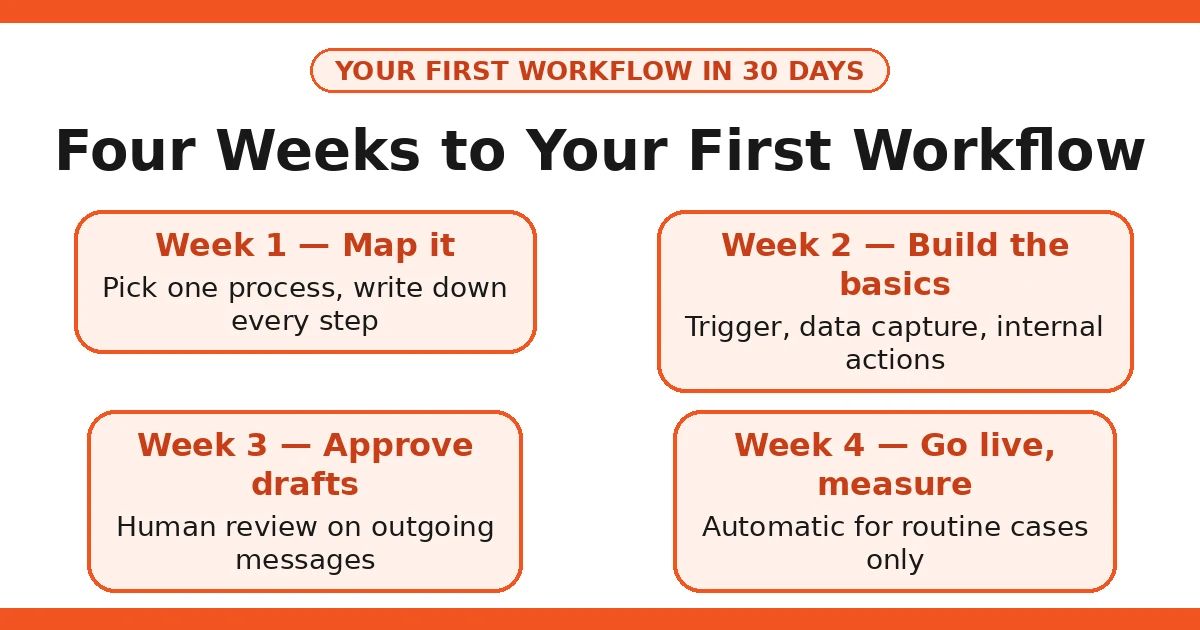
Week 1: Map your enquiry process. Pick one workflow. Check your existing tools for built-in automation before buying anything.
Week 2: Build the trigger and data capture. Test with real, messy examples. Add internal actions and a draft-only customer message.
Week 3: Run it with human approval on every outgoing message. Read every draft. Fix the failures. Document the workflow and its off-switch.
Week 4: Switch straightforward cases to automatic sending, keep exceptions human. Measure response time and lost enquiries against your baseline. Pick the next workflow.
That is the whole method. It is not glamorous, and that is the point: the businesses that get the most from automation are the ones that treat it as careful, boring operational work, not as a transformation project.
Honest limits
AI workflow automation will not fix a business that does not know its own processes, will not rescue a weak offer, and will not replace the conversations that actually win customers. It also has real failure modes: AI steps misread unusual inputs, connectors break when a third-party app changes its interface, and a workflow built by one person can become a mystery to everyone else within months if it is not documented.
There are also things it should not touch. Pricing decisions, complaint resolutions, anything involving vulnerable customers, and any decision with legal consequences should keep a human in the loop — not because the technology cannot do them, but because the cost of being wrong is too high and the accountability must sit with a person.
Costs deserve honesty too. Subscriptions add up: a connector, a CRM, and an AI tool can quietly reach a meaningful monthly total, and the time spent maintaining workflows is real. If a workflow saves two hours a month but costs an hour a month to maintain and a subscription fee, it is marginal — and you should be willing to switch it off.
Finally, vendor claims deserve scepticism. When a tool promises dramatic time savings or productivity gains, remember those figures come from the vendor’s own marketing, often from its happiest customers. Your own measured baseline — response time, lost enquiries, hours saved — is the only number that matters for your business.
FAQs
What is AI workflow automation for a small business?
It is the use of software to carry out the repetitive steps of a business process — collecting information, moving it between systems, drafting messages, and flagging exceptions — so staff only handle the decisions and the edge cases. It is not a robot replacing your team; it is the boring middle of a job disappearing.
How much does AI workflow automation cost a UK small business?
Most small businesses start with tools they already pay for, such as their email, CRM, or accounting software, plus one automation tool on a modest monthly plan. The real cost is usually the time spent setting the first workflow up properly and testing it, not the subscription.
Do I need technical skills to set up workflow automation?
No. Modern no-code automation tools are built for non-technical users: you pick a trigger, pick the actions, and test. What you do need is a clear map of the process you are automating — if the manual process is messy, automating it will only make the mess faster.
Is AI workflow automation GDPR compliant?
It can be, but compliance is your responsibility, not the tool’s. Under UK GDPR you need a lawful basis for processing personal data, a data processing agreement with any tool that handles personal data, and appropriate security. Keep a human check in place before anything customer-facing or financial goes out.
What should a small business automate first?
Start with one high-volume, low-judgement task that you already do the same way every time — for example, acknowledging a new enquiry, routing a form submission to the right person, or chasing an unpaid invoice reminder. One working workflow teaches you more than five half-built ones.
What should I never fully automate?
Anything where a mistake would cost a customer, a relationship, or money: final quotes, refunds, complaint responses, dismissals, and anything involving sensitive personal data. Automate the draft and the data-gathering, but keep a human approving the send.