Direct answer:
AI document automation means your quotes, contracts, forms, and reports get built from data you already hold — customer details, prices, scope — instead of being retyped from scratch every time. A human still reviews and approves each one before it goes out. The time saved is real, but only if the templates are right and the checks stay in place.
The document problem in a small business
Ask a small business owner where their week goes, and documents are near the top of the list. A quote for a returning customer still takes an hour because someone retypes the address, looks up the last price, checks the VAT treatment, formats the document, converts it to PDF, and emails it. A contract takes longer. A monthly report takes longer still, because it means gathering figures from three different systems and writing them up by hand.
The frustrating part is that most of this work is not skilled work. The skill is in deciding the price, the scope, and the terms. The rest — copying, formatting, calculating, filing — is administration wearing a suit. Document automation separates the two: the machine does the administration, and the human does the deciding.
There is a second, quieter cost. Documents produced by hand vary. One quote includes payment terms, the next forgets them. One contract uses the current template, another uses a version from two years ago that someone saved to their desktop. That inconsistency is where disputes start. Automation, done properly, makes every document consistent — same terms, same layout, same calculations — which is worth as much as the time saved.
What AI document automation actually does
The phrase covers several distinct capabilities, and it helps to separate them:
- Template filling. Data from your CRM, accounting software, or a form fills a template automatically: names, addresses, line items, dates, reference numbers. This is the workhorse, and it needs no AI at all.
- Extraction. AI reads an incoming document — a supplier invoice, a completed client form, a scanned letter — and pulls out the structured data: amounts, dates, names, reference numbers. This is where AI earns its place, because incoming documents are messy and inconsistent.
- Drafting. AI drafts sections of a document from a brief: a scope paragraph from bullet points, a summary from a set of figures, a cover note from the context of the job. The draft is a starting point for a human, not a finished product.
- Routing and filing. Once approved, the document goes where it needs to go — emailed to the customer, stored in the right folder, logged in the CRM, with a reminder set if it is not signed or paid.
Most small businesses need the first and the fourth heavily, the second for incoming paperwork, and the third sparingly. Buying a tool that promises all four at full power on day one is usually overkill. Start with template filling and routing; add extraction and drafting where they solve a specific pain.
The four document families, and how each one changes
Quotes
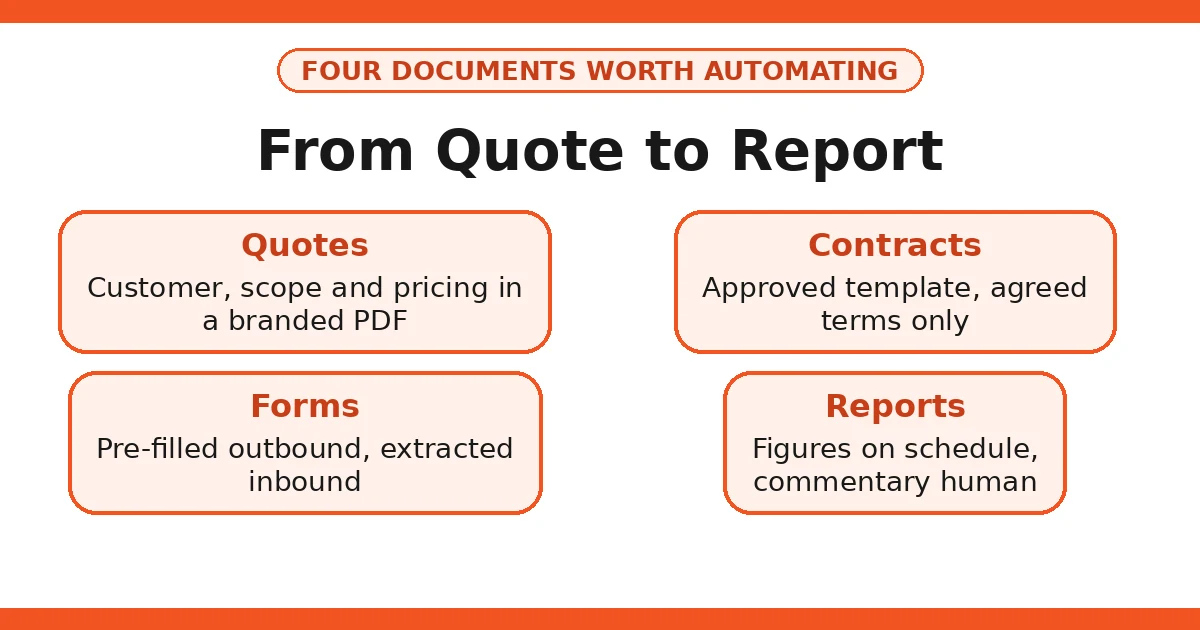
A quote is the document most worth automating first, because it is high-volume, directly tied to revenue, and usually built from a small set of variables: customer, scope, line items, price, validity period, terms.
A working automated quote flow looks like this:
- The enquiry or opportunity in your CRM holds the customer details and the scope discussed.
- You select the service lines and quantities — or they are pulled from a standard price list.
- The system applies your rules: standard VAT treatment (20% for most UK goods and services), any trade discount, payment terms, and validity period.
- A clean, branded quote is generated as a PDF.
- You check the price, the scope, and the customer details, then send it.
- If the customer has not responded in a set number of days, a polite follow-up is triggered.
The human check matters here more than anywhere else. A quote is a commercial commitment. Check the scope against what was actually discussed, check the price against the current price list, and check that the customer’s details are correct. Automation should make that check faster — the draft is already assembled — not remove it.
One practical detail: keep your price list in one place, and make the quote template read from it. If prices live in three spreadsheets and someone’s head, automation will faithfully reproduce whichever wrong price it finds first.
Contracts and agreements
Contracts are the documents where caution matters most. The right approach is template-first: your standard terms are drafted or reviewed by a solicitor once, locked into a template, and then automation fills in only the variables — parties, scope, price, dates, and any agreed variations.
What automation should never do with contracts is invent or alter terms. An AI step that “helpfully” adds a clause, softens a liability limit, or changes a payment term has created a legal problem, not saved time. The rule is simple: the template is fixed, the variables are filled, and anything outside the template goes to a human — ideally the solicitor who approved the template.
For signing, electronic signatures are widely accepted in the UK for most commercial agreements under the Electronic Communications Act 2000, and tools that provide an audit trail (who signed, when, from what device) are worth the modest cost. Keep the signed copy filed where you can find it — a contract you cannot locate is barely better than no contract.
Forms
Forms are where small businesses bleed time in both directions: customers fill them in badly, and staff retype them worse. Document automation improves both ends:
- Outbound forms. Client onboarding forms, briefing questionnaires, and service agreements pre-filled with everything you already know, so the customer only supplies what is new. Fewer fields means higher completion.
- Inbound forms. When a completed form comes back, extraction pulls the data into your CRM or job system automatically, instead of someone retyping it. This is also where errors drop sharply: retyping is where typos enter a business.
A note on design: a form that asks for everything at once gets abandoned. Split long forms into stages, ask for the minimum at each stage, and explain why you need anything sensitive. Under UK GDPR, you should only collect personal data you actually need for the purpose — a shorter form is both better for completion and better for compliance.
Reports
Monthly reports — for clients, for management, or for your own review — are the most automatable documents of all, because they are assembled from data that already exists in your systems. A typical automated report flow:
- On a schedule (say, the first working day of the month), the system pulls the figures: jobs completed, invoices issued, payments received, outstanding items.
- A template assembles them into a readable report with tables and short summaries.
- A human reviews the figures, adds the commentary that only a human can write — what went well, what needs attention — and approves it.
- The report is sent and filed.
The commentary is the part that must stay human. A report that is only figures is a spreadsheet with better formatting. The value of a monthly report is the judgement in it: what the numbers mean and what should happen next. Automation gives you the figures on time, every time; you supply the thinking.
Building it: a step-by-step setup
Step 1: Audit your documents
List every document your business produces regularly, and for each one note: how often, how long it takes, how much varies between instances, and what goes wrong most often. The automation candidates are the ones that are frequent, similar each time, and currently slow.
You will probably find that three or four document types account for most of the time. Those are your starting list, in order of frequency.
Step 2: Fix the templates before automating them
Automation multiplies whatever is in the template — including its mistakes. Before building anything, review each template: are the terms current, is the VAT treatment right, does the branding match, is the language clear? If a solicitor has not reviewed your contract template recently, now is the time.
Also settle the single-source-of-truth question for each data field. Customer addresses come from the CRM, prices from the price list, payment terms from the accounting system. Write it down. If two systems disagree, automation cannot resolve it — it will just pick one.
Step 3: Connect the data sources
Document automation tools connect to your CRM, accounting software, and form tools, pulling the fields the template needs. Most modern tools do this through standard integrations without code. The work is mapping: which field in the CRM goes to which blank in the template.
Test this mapping with real records, including awkward ones: a customer with a long company name, an address with a flat number, a job with an unusual scope description. Templates break on edge cases, and it is better to find them in testing than in front of a customer.
Step 4: Build the approval step in from the start
Every document that leaves your business should pass through a human approval step. Build this into the workflow, not as an afterthought: draft generated → notification to the responsible person → approve, edit, or reject → send and file.
For low-risk internal documents, approval can be a quick glance. For quotes, contracts, and anything financial, it should be a genuine check: price, scope, terms, recipient. The approval step is also your quality control for the automation itself — if the same error appears twice, the template or the data mapping needs fixing.
Step 5: Automate the follow-through
A document that is sent but never followed up is half a job. Build the follow-through into the same workflow: quote sent → follow-up if unanswered → reminder if still unanswered → task for a human. Contract sent → reminder to sign → filed once signed → renewal or expiry reminder set. Report sent → filed and logged.
This is where document automation connects to workflow automation more broadly — the document is one step in a longer chain.
Tools: what to look for
| What to check | Why it matters |
|---|---|
| Template control | You must be able to lock the legal and commercial wording while leaving the variable fields open. |
| Data integrations | It must connect to the systems you actually use — CRM, accounting, forms — without custom development. |
| E-signature with audit trail | Who signed, when, and from where, stored with the document. |
| Version history | Every version of every document retrievable, so you can prove what was sent and when. |
| Access controls | Who can view, edit, approve, and send each document type — not everyone needs every permission. |
| UK data handling | Where data is stored and processed, and whether a data processing agreement is available. |
| Export and exit | Can you export all your documents and templates if you leave? Never let a tool hold your documents hostage. |
You do not need the most powerful tool on the market. You need the one that connects to your existing systems, that your team will actually use, and that lets you leave with your documents intact.
The UK compliance checklist
Documents are where compliance gets concrete, because documents contain personal data and create legal commitments. Work through this checklist for each automated document type:
- UK GDPR lawful basis. For customer documents, this is usually contract performance or legitimate interests. For employee or sensitive documents, be more careful — and take advice.
- Data minimisation. Only include the personal data the document actually needs. A quote does not need a customer’s date of birth; if your template includes it, remove it.
- Data processing agreements. Any tool that stores or processes documents containing personal data needs a DPA with you. Check before you buy, not after.
- Retention. Decide how long each document type is kept, and make sure the tool can enforce it. Keeping everything forever is not a retention policy — and under UK GDPR, it is a liability.
- Access and security. Restrict who can see salary details, contract terms, and customer data. Use the tool’s permission settings, not just trust.
- Marketing rules. If a document workflow also sends marketing messages — a quote follow-up that slides into a promotion, for example — the PECR rules on consent and unsubscribe apply. Keep marketing separate from transactional documents.
- Financial accuracy. VAT treatment, invoice numbers, and payment details must be right every time. The standard UK VAT rate is 20% for most goods and services, but exemptions and special schemes exist — if your business uses one, make sure the template reflects it, and check with your accountant.
For a deeper treatment of the data protection side, see our GDPR and AI guide for UK small businesses.
Worked example: a quote, before and after
Consider a small electrical contractor quoting a consumer-unit replacement. Before automation: the office manager finds the customer’s details in an old email, checks the last price in a spreadsheet, types the quote in a word processor, formats it, converts it to PDF, emails it, and files a copy. Elapsed time: the best part of an hour, and the price might be last year’s.
After automation: the customer record in the CRM already holds the address and contact details. The manager selects the job type and the standard line items from the price list. The system applies the current prices, the 20% VAT treatment, the standard payment terms, and the 30-day validity. A branded PDF is generated. The manager checks the scope and the total, approves, and sends it. Elapsed time: a few minutes of the manager’s attention, plus a short check.
Nothing about the commercial judgement changed. The manager still decides the scope and confirms the price. What disappeared was the retyping, the searching, and the formatting — and with them, the errors those steps introduce.
Common mistakes
- Automating a bad template. If the template has wrong terms, automation sends wrong terms faster and more consistently. Fix the template first.
- Letting AI write terms. AI drafting is for scope paragraphs and summaries, not for legal clauses or pricing decisions. Keep those locked in approved templates.
- No version control. When two people edit a template independently, customers start receiving different versions. One owner per template, with changes logged.
- Skipping the approval step for speed. The approval step is the whole point of keeping a human in charge. Removing it to save a minute converts a small time saving into a real risk.
- Over-collecting data. Forms that ask for everything “just in case” breach data minimisation and put customers off. Ask for what the document needs, nothing more.
- Forgetting the archive. Documents must be findable months later — by customer, by date, by type. Agree a filing structure before you automate, or you will automate your way into a mess that is harder to search than the old one.
- Automating every document at once. Start with one document type, prove it, then move on. Four half-automated document types are worse than one fully working one.
Measuring the return
Track a few honest numbers for each automated document type:
- Time per document. Before and after, measured on real jobs — not the best case, the typical case.
- Error rate. How often does a document go out with a wrong price, wrong address, or missing term? This should fall sharply.
- Turnaround time. How long from request to sent document? For quotes, this directly affects win rates — a quote that arrives the same day beats one that arrives next week.
- Follow-up completion. Are quotes actually being followed up now that the follow-up is automated? Count it.
- Template fixes. How often does a template need correcting? A high rate means the template or the data mapping is wrong, not that automation has failed.
Be honest about the costs too: the subscription, the setup time, and the ongoing maintenance. A document type produced twice a year is not worth automating, however elegant the automation would be.
Where document automation fits the wider picture
Documents do not exist in isolation. A quote becomes a contract, a contract becomes an invoice, an invoice becomes a payment, and the whole chain becomes a report. The businesses that get the most from document automation are the ones that connect it to the rest of their operations: the CRM holds the customer, the document tools produce the paperwork, the accounting system tracks the money, and automated reminders keep the chain moving.
That wider picture is workflow automation, and it pairs naturally with tools for specific jobs — for example, WhatsApp automation for keeping customers updated once a document is sent, or AI email management for the inbox where many of those documents arrive. Start with the documents, then connect the chain.
Honest limits
Document automation will not make a bad offer good, will not replace legal advice, and will not fix a business whose prices, terms, or customer records are a mess. It will, in fact, expose that mess quickly — which is useful, but uncomfortable.
AI extraction is not perfect. Handwriting, unusual layouts, and poor scans still defeat it, and a misread figure in an invoice or a contract is worse than a slow manual entry. Keep a human check on anything extracted from an incoming document before it enters your systems.
There are also documents that should stay largely manual: heavily negotiated contracts, anything involving a dispute, settlement agreements, and anything where the wording itself is the negotiation. Automation serves standard documents; bespoke documents need bespoke attention.
Finally, treat vendor claims with the same scepticism as any sales pitch. A vendor’s case study showing dramatic time savings reflects that vendor’s best customer, not your business. Measure your own baseline, run one document type properly, and judge by your own numbers.
FAQs
What is AI document automation for a small business?
It is software that creates, fills, and routes business documents — quotes, contracts, forms, invoices, reports — by pulling data from your existing systems and drafting the content, so staff review and approve instead of retyping. The human stays in charge of the final version.
Can AI safely draft contracts for a small business?
AI can draft from your approved templates and fill in the agreed terms, which saves real time. It should not invent clauses or decide terms. For anything unusual, high-value, or legally sensitive, have a solicitor review the template itself — then automation can safely reuse that approved wording.
How does document automation help with quotes?
It pulls customer details, product or service lines, and your standard pricing into a quote template, applies your rules for discounts and VAT, and produces a consistent, professional document in minutes instead of an hour. A human still checks the price and scope before it goes out.
Is AI document automation GDPR compliant?
It can be, provided you have a lawful basis for the personal data in the documents, a data processing agreement with the tool provider, and proper access controls. Documents often contain personal data, so who can view, edit, and send them matters as much as the tool itself.
What documents should a small business automate first?
Start with the document you produce most often with the least variation — usually quotes or standard client onboarding forms. High volume and low variation is the sweet spot; one-off, heavily negotiated documents come later, if ever.
Will automated documents look generic to customers?
Only if you let them. A good template uses the customer’s actual details, the specific scope discussed, and your own tone — the automation removes the retyping, not the personalisation. If a document reads like a form letter, the template needs work, not the concept.