Direct answer: Shadow AI is your team using AI tools the business never approved — usually a free chatbot on a personal account, usually with company or customer information pasted in. The UK’s National Cyber Security Centre published a warning about it on 7 September 2026. The fix isn’t to ban AI: find out what’s in use, approve one proper business tool, adopt the one-page AI policy template below, talk to your team, and block the rest.
What “shadow AI” actually means
The NCSC’s definition is plain: shadow AI is “the use of AI technology which isn’t captured in an organisation’s approved systems and processes.” It treats it as a form of shadow IT — the same problem businesses had a decade ago with staff using personal Dropbox accounts, except now the thing being shared is your data with a chatbot.
Picture the everyday version. A team member copies a client’s contract into a free chatbot to “tidy up the wording.” Another pastes a spreadsheet of customer details to “make sense of the numbers.” Nothing looks wrong, and the work gets done faster. But now a copy of your client’s information sits on a server run by a company you have no agreement with. Nobody in your business has read the terms. That is shadow AI.
How common is this in UK businesses?
More common than most owners expect. The numbers below come from named, recent surveys — not vendor guesses.
| Finding | Source |
|---|---|
| 71% of UK employees have used unapproved consumer AI tools at work | Microsoft UK / Censuswide, Oct 2025 (2,003 UK employees) |
| 51% were still doing it every week | Microsoft UK / Censuswide, Oct 2025 |
| Top uses: drafting workplace communications (49%), reports and presentations (40%), finance-related tasks (22%) | Microsoft UK / Censuswide, Oct 2025 |
| 41% used unapproved AI because they already knew how; 28% because their company offered no approved alternative | Microsoft UK / Censuswide, Oct 2025 |
| Only 32% were worried about the privacy of the data they put in | Microsoft UK / Censuswide, Oct 2025 |
| 24% of AI-engaged UK firms found AI tools or agents running without approval in the last six months | Pax8 Q3 2026 SMB AI Pulse Report (1,150 leaders, 350 in the UK) |
| Only 23% of AI-engaged UK firms have a formal, documented review process for the AI they build | Pax8 Q3 2026 SMB AI Pulse Report |
| 40% of small and mid-sized business decision-makers have no AI policy at all (global survey) | ESET 2026 (4,400 decision-makers) |
The Microsoft figures are the ones to sit with: nearly three-quarters of UK employees have done this, half do it weekly, and most aren’t worried about it. Your staff aren’t being reckless. They’re trying to get through the day, and a chatbot on their phone helps.
Why it matters: the three things the NCSC lists
The NCSC’s September 2026 post lists three consequences, and they’re worth quoting because they’re specific:
1. Your information leaves your control. Once a client’s contract or your pricing is inside a consumer AI service, it may be stored, retained, or used to improve that service. None of that sits inside any security arrangement your business has. If a client asked where their data had been, you could not answer.
2. You lose visibility. You cannot see what has been shared, by whom, or when. There is no log to check and nothing to search for if a client or a solicitor asks. As the NCSC puts it: “You cannot manage what you do not know.”
3. You open a new door for attackers. AI agents are complex software, and complex software has vulnerabilities. An attacker who exploits one gains the same access as the agent. For a tool signed into someone’s Google account, that can be a great deal.
Then there’s the regulatory side, which the NCSC doesn’t need to spell out for a UK audience: if the information was personal data, UK GDPR expected you to know where it went and to have a lawful basis for sending it there. Our GDPR and AI guide for UK small businesses covers what that means in practice — but “a team member pasted it into a chatbot” is not an answer the ICO will enjoy.
Why banning AI backfires
The instinct is to ban it. The NCSC’s advice says plainly that a ban will not work, and the survey data explains why: 28% of employees reached for unapproved tools because their company offered no approved alternative, and 41% because the tool they knew from home was quicker than asking. A blanket ban doesn’t remove the need — it removes your visibility of it, while blocking legitimate productivity gains.
Business policies have not kept pace with how fast AI arrived, so people stopped waiting. If your business hasn’t told them which AI tool to use and why, they will pick one for you.
The 5-step fix for a small business
This is the practical version of the NCSC’s advice, sized for a business without an IT department:
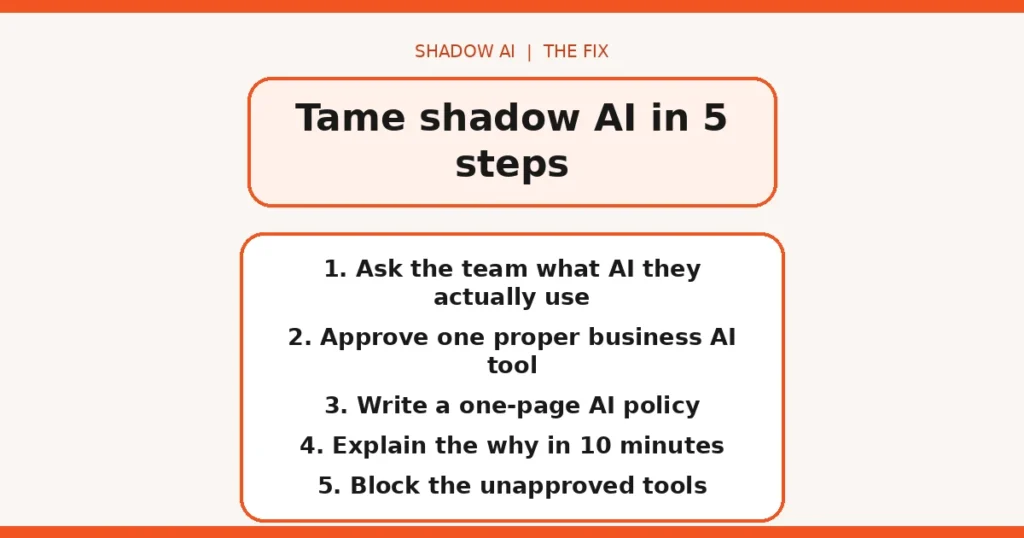
Step 1 — Ask, don’t snoop. Run a short anonymous survey or a ten-minute team chat: which AI tools have you used for work, and for what? The NCSC recommends building a culture where people feel able to say which tools they use and why. The answers tell you what the approved tool needs to do — and you’ll hear about the free accounts before they cause a problem.
Step 2 — Approve one proper tool. Give the team an approved AI assistant that covers the jobs they were doing with the unapproved ones. The sensible default is AI inside systems you already pay for — the AI built into your Google Workspace or Microsoft 365 business plan sits within the same account, security settings, and admin controls as your email and files, under a business data agreement rather than consumer terms.
Step 3 — Adopt a one-page AI policy. Which tools are approved. What information may go into them. And what can never go into any AI tool at all: client data, financial details, passwords, anything covered by a contract or NDA. Use the template in the next section — keep it to one page, because a policy nobody reads is decoration.
Step 4 — Talk through the why. Ten minutes with the team. Most staff aren’t reckless; they’re busy. When people understand that a free chatbot’s default terms may allow human reviewers to read what they paste, the rule stops feeling arbitrary.
Step 5 — Block the rest, technically. Policies get forgotten on a busy afternoon. On work devices and work accounts, block the unapproved AI tools (or at least block them from connecting to your business data) so the policy has teeth. A well-meaning team member who tries to open one simply can’t.
Your one-page AI policy template (copy and adapt)
Below is a template sized for a UK small firm. Replace the bracketed bits, keep it to one page, and pin it where the team will actually see it.
Our AI policy — [Business name]
Approved tools: [e.g. the AI built into our Google Workspace / Microsoft 365 plan]. These are the only AI tools approved for work. Anything else needs written approval first — ask [name], don’t just try it.
You may use approved AI for: drafting emails and documents, summarising meetings, research, and first drafts of marketing content. Always check AI output before it reaches a customer or supplier.
Never put into any AI tool: client or customer personal data, financial details, passwords or login credentials, anything covered by a contract, NDA, or client confidentiality agreement, and unreleased business plans or pricing.
Why this exists: information pasted into unapproved AI tools leaves our control — it may be stored or used to train the service, and we have no agreement with the provider. Under UK GDPR we must know where personal data goes. If you’re unsure whether something is safe to paste in, ask before you paste.
Review date: [every 3–6 months — new AI features appear inside software we already use]
Two notes on using it. First, the “never” list matters more than the “approved” list — most shadow AI incidents are someone pasting the wrong thing into the right kind of tool. Second, put a review date on it and keep it. AI features now arrive inside email, CRM, and design software you already pay for; a policy that doesn’t get revisited silently goes out of date.
Honest limits
A straight account of what this fix doesn’t do:
- An approved tool doesn’t make you GDPR-compliant by itself. You still need a lawful basis for processing personal data through it, and you should read the provider’s data policy rather than assuming the paid tier handles everything.
- It doesn’t recover the past. Nothing in this process retrieves data staff already pasted into free tools. If that included client personal data, you may have a breach to assess — our UK AI statistics roundup shows how far behind most small firms are on exactly this.
- Free tiers of business tools still need checking. “Business plan” and “free account” can have very different data terms from the same provider. Approve the specific plan, not the brand.
- Policies rot. New AI features appear inside software you already use (email, CRM, design tools). Revisit the approved list every few months, or it silently goes out of date.
None of this requires an IT department — but if you’re already using AI agents in the business, the stakes are higher, because an agent acts with your credentials, not just your text.
FAQs
What is shadow AI in simple terms?
Shadow AI is when your staff use AI tools your business has never checked or approved — usually a free chatbot on a personal account, usually with company or customer information pasted into it. The UK’s National Cyber Security Centre defines it as AI use that “isn’t captured in an organisation’s approved systems and processes.”
Is shadow AI illegal?
Using an unapproved AI tool isn’t a crime in itself, but it can easily break the law. If staff paste personal data into a tool with no data agreement, you may breach UK GDPR — you must know where personal data goes and have a lawful basis for sending it there. “A team member pasted it into a chatbot” is not an answer the ICO will enjoy.
How do I find out if my staff are using unapproved AI tools?
Ask them. The NCSC recommends building a culture where people feel able to say which tools they use and why. A short anonymous survey or a 10-minute team chat will surface most of it — 41% of UK employees who used unapproved AI said they did so simply because they already knew how the tool worked.
What is the first step to fix shadow AI in a small business?
Give your team one approved AI tool that does the job they were doing with the unapproved ones. Ideally pick AI inside systems you already pay for, such as your Google Workspace or Microsoft 365 business plan, where admin controls and a data agreement exist. Then write a one-page policy naming the approved tools.
Should I just ban AI tools at work?
No — the NCSC explicitly warns a ban will not work. Staff need to get work done, and a blanket ban drives AI use further underground while blocking legitimate productivity gains. Approve one good tool, explain the rules, then block the unapproved ones technically.
Does paying for a business AI plan solve shadow AI on its own?
It solves the biggest part — data handling and admin control — but not everything. A paid plan typically keeps your content out of model training and gives you logs and retention controls, but you still need a policy, a team conversation, and technical blocks on unapproved tools. And nothing recovers data that was pasted into free tools before you started.
Where can I find an AI policy template for a UK small business?
Use the one-page template in this guide — it covers approved tools, what may go into them, and what must never go into any AI tool. It reflects the NCSC’s September 2026 shadow AI guidance and UK GDPR basics. Adapt the tool names and the never-share list to your business, keep it to one page, and review it every few months as new AI features appear.